Xbox Game Pass may be unavailable when an Xbox account, Store, licensing, gaming, or cloud service has an incident—but a static article cannot tell you the live answer. Start with the official Xbox Status page. If Microsoft lists a problem that matches your symptom, wait for its incident updates before changing console, account, or network settings.
If the official dashboard shows no matching issue, the failure may be limited to one game, device, account, app, ISP, or home network. The checks below take you from the least disruptive test to more specific console and PC fixes.
Check Xbox Game Pass server status first
“Game Pass is down” can describe several different failures. You might be unable to sign in, see your subscription, browse the Store, verify a game license, join multiplayer, or start a cloud session. Those actions do not all depend on one switch, so do not stop after seeing that one unrelated Xbox feature is healthy.
Open Xbox Status and expand any incident that resembles what you see. Pay attention to the reported platforms, features, start time, and latest update. A problem under Store or subscriptions can block a Game Pass entitlement check while party chat still works. A cloud-gaming incident may interrupt streaming while an installed game launches normally.
| Your symptom | What to inspect first | Useful second check |
|---|---|---|
| Cannot sign in or load a profile | Account and profile status | Try the same account on another device |
| Membership or purchase is missing | Store and subscription status | Check the Microsoft account services page |
| Installed Game Pass titles will not launch | Games, gaming, and licensing incidents | Try a second title from your current plan |
| Cloud play will not start | Cloud gaming status | Try an installed game or another supported device |
| One game's matchmaking is offline | The publisher's own service status | Try another online Xbox game |
You can also use the current Game Pass catalog to confirm that the title still belongs to the expected plan and platform. Catalog membership and server health are separate questions: a healthy Xbox network cannot grant access to a game that left the catalog or is not included in your tier.
Is it an Xbox outage or just your connection?
Do a scope test before rebooting everything. Ask whether the same failure appears on another device, another network, another account, or another game. Each successful comparison removes a possible cause. For example, if cloud gaming fails on both your phone and PC over different internet connections while Xbox reports a cloud incident, the evidence points away from your router.
If only one console fails while the Xbox website and another device work, start locally. If several unrelated Xbox features fail for many users and Microsoft has posted an incident, stop changing settings. Repeated password changes, app reinstalls, and factory resets will not repair a Microsoft-side service.
Signs of a broad Xbox outage
- The official status dashboard acknowledges a matching incident.
- Sign-in, Store, game launch, and cloud features fail at roughly the same time.
- The problem follows your account across more than one device or network.
- Friends in different locations report the same symptom.
- Community report volume rises sharply, with similar error descriptions.
Signs the problem is local
- Only one game fails while other Game Pass titles launch.
- Only one console or PC is affected.
- The service works over mobile data but not your home connection.
- Another account works on the same device, or your account works elsewhere.
- The official dashboard is normal and no wider report pattern is visible.
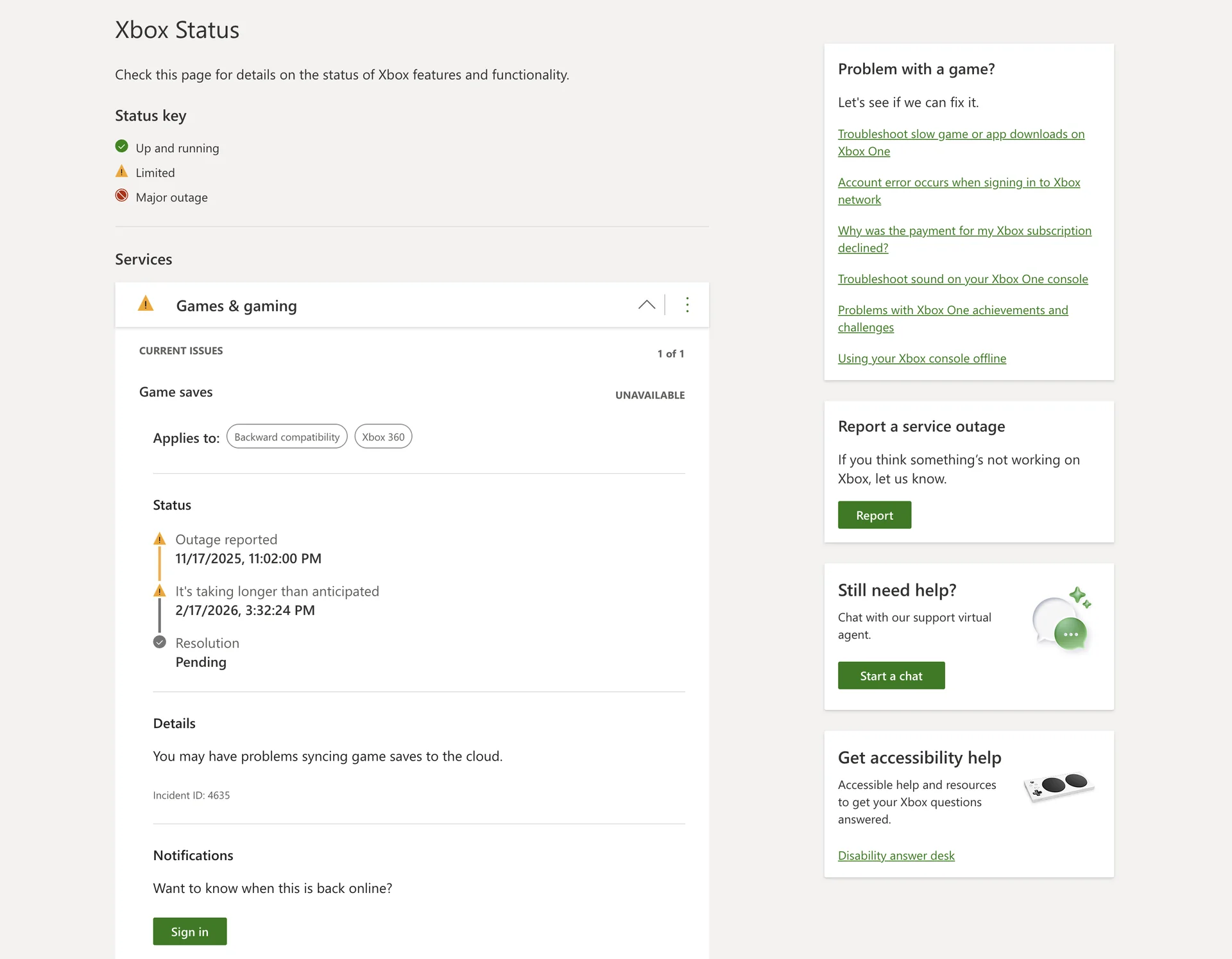
A normal status page does not prove your device is healthy, and a spike on a community tracker does not prove Microsoft has confirmed an outage. Use both as signals, then test the scope.
What “Xbox Game Pass is down” can actually mean
Game Pass combines a subscription entitlement with account, Store, download, game-license, multiplayer, and cloud systems. Your error usually comes from one of those layers rather than from the entire Game Pass catalog. Naming the failed action makes both status checking and troubleshooting faster.
| What fails | Likely layer | Best next check |
|---|---|---|
| Profile will not sign in | Account service or authentication | Official status, then account sign-in on the web |
| Game shows “buy” or “do you own this?” | Subscription, plan, catalog, or license verification | Membership account, current plan, and game availability |
| Downloads or Store pages fail | Store, app, storage, or network delivery | Store status and a second device/network |
| Cloud queue or stream fails | Cloud capacity, service health, region, or connection quality | Cloud status and an installed-game comparison |
| Only multiplayer fails | Xbox multiplayer, NAT, or the game's publisher servers | Another online game and the publisher's status page |
| Only the Windows Xbox app fails | App, Microsoft Store, Gaming Services, or Windows | Web/console comparison, updates, then app repair |
This distinction also prevents false outage alarms. A newly announced game may not be available on your platform yet, or it may require a different tier. Check the new and coming Game Pass games page for catalog timing, then use the plan comparison for tier differences. An individual game's own server maintenance remains the publisher's responsibility even when you installed it through Game Pass.
Five-minute fixes for Xbox Series X|S and Xbox One
Use these steps only when the official status does not show a matching incident, or after Microsoft says the incident has recovered and your console still fails. Test after each step so you know what changed.
- Try a second game or Xbox feature. If one title fails, check that publisher's status and the game's current Game Pass plan before treating it as a console outage.
- Run the console's network test. A failed connection or multiplayer test points toward the home network, ISP, NAT, or DNS rather than a missing subscription.
- Fully quit and reopen the affected game or app. Resuming an old suspended session can preserve a stale sign-in or license state.
- Restart the console. Use a full restart, wait for sign-in to complete, and test again.
- Restart the modem and router if other devices also struggle. Wait until the connection is fully restored before retesting Xbox.
- Check the signed-in Microsoft account and membership. If the error is limited to Game Pass access, confirm that the active subscription belongs to that account and that the game is included in its current tier.
Do not remove accounts, clear every saved game, or factory-reset the console as an early outage response. Those steps create more work and can obscure the original symptom. If an error code appears, record it and use Xbox Support's exact error lookup before making a larger change.
A Game Pass license check can also fail after a title leaves the service. That is not an outage: you may need to buy the game, switch to an edition that remains included, or choose another title. The catalog's plan and platform filters provide a faster answer than reinstalling a game that is no longer available to your membership.
Fix the Xbox app and Game Pass on Windows PC
If Game Pass works on a console or in a browser but not in the Windows Xbox app, treat it as a PC-specific problem. Check Windows Update and the Microsoft Store library for updates to the Xbox app and Gaming Services. Then confirm that the Xbox app and Microsoft Store use the intended Microsoft account; mismatched accounts can make a valid membership look unavailable.
Next, restart the PC and try another installed Game Pass title. If only one game fails, use that game's repair or verification option when available. If the Xbox app itself will not open or load, Windows provides Repair and, for supported apps, Reset under the app's Advanced options. Try Repair first because Reset can remove local app data and require sign-in again.
Gaming Services errors deserve error-specific guidance. Microsoft has published fixes for particular codes such as 0x80073D26 and 0x8007139F on Windows 10, but that old procedure is not a general solution for every Game Pass outage. Do not paste registry-removal or PowerShell commands from an old forum post unless the current Microsoft support page matches your exact error and Windows version.
For a final scope check, open the Game Pass games list in a browser. If the site loads, your account works elsewhere, and Xbox reports no incident, capture the app version and exact error before contacting support. That evidence is more useful than saying only that “Game Pass is down.”
Should you trust Reddit, X/Twitter, or an outage map?
Reddit threads, posts on X, and third-party outage trackers are useful early-warning signals. A sudden burst of people describing the same sign-in or game-launch error can show that you are not alone, especially during the minutes before an official dashboard changes. Community posts can also reveal whether reports concentrate on one console, ISP, country, or game.
They are not confirmation of the cause. Popular games generate report spikes during publisher maintenance, one ISP problem can look regional, and old posts often resurface in search. A crowdsourced Xbox Live outage map shows where users submitted reports; it is not a map of Microsoft server locations and it cannot reliably tell you whether a problem exists “near me.”
Use a three-source rule: check Xbox Status, look for a recent official Xbox Support update, and then use community reports for context. Give the official incident notice more weight than anonymous estimates or screenshots without a visible time. If community reports rise while official status remains normal, perform the scope tests above and check again after a short interval.
How long will Xbox servers be down?
There is no dependable universal duration. A brief authentication fault, a large licensing dependency failure, planned maintenance for one game, and a regional network disruption require different repairs. The length of a previous Xbox outage does not create a countdown for the current one.
Use the latest timestamp on the official incident notice. Microsoft may report that engineers are investigating, mitigating, monitoring recovery, or that service has been restored. Recovery can also arrive in stages: one person may sign in while another device still holds an expired session or cached error. After a resolved notice, restart the affected app or console and test again before assuming the outage continues.
If no estimate is published, retry every 15 to 30 minutes instead of repeatedly signing in or changing passwords. Save any unsynced offline progress, avoid purchases while Store or subscription status is uncertain, and wait for a confirmed recovery before applying invasive fixes. Contact Xbox Support when official status is healthy, the problem survives the local checks, and you can provide a specific error, device, account context, and start time.
Xbox Game Pass outage FAQ
Is Xbox Live the same as Xbox Game Pass?
No. Game Pass is a subscription with catalog and membership benefits, while the Xbox network supports broader services such as accounts, Store activity, multiplayer, gaming, and cloud features. Game Pass depends on several of those services, so an Xbox network incident can affect members without being a catalog problem.
Why does Game Pass say I do not own a game?
Check four things: you are signed into the account that owns the membership, the subscription is active, the game is still included in your plan and platform, and Xbox has not reported a licensing or Store incident. The same message can describe an account mistake, a catalog change, or a temporary service problem.
Can Game Pass be down only on Xbox Series X?
A device-specific or platform-specific failure is possible. Test the same account in a browser, on another supported device, or on another network. If only the Series X|S console fails and Xbox has not acknowledged an incident, run the console network test and restart the affected app or console.
Why is the Game Pass website down when my console works?
The website, Store pages, browser sign-in, content delivery network, and console gaming services are separate layers. Try a private browser window and a second connection after checking Xbox Status. If those work, clear only the affected site's browser data or disable a problematic extension rather than resetting the console.
What is Xbox Assist?
Xbox Assist was introduced as a personalized support experience on Xbox consoles and was later referred to as Xbox Support. It is not a separate outage network or independent status provider. For live service health, use the official Xbox Status page.
Where is the official Xbox outage map?
Microsoft provides a service-status dashboard, not a consumer “near me” map of Xbox servers. Geographic outage maps are generally third-party visualizations of user reports. They can help identify a report cluster, but they do not confirm Microsoft's cause, scope, or recovery time.
Use status, scope, then the smallest fix
Start with Xbox Status. If it reports your symptom, follow the incident rather than rebuilding your setup. If it does not, test another game, device, account, and network to find the scope. Then apply the smallest relevant console or PC fix and stop as soon as service returns.
That order answers both urgent questions—whether Xbox Game Pass is down and what you can do—without turning a temporary server incident into a larger account or device problem.
Comments
Comments are reviewed before publication. Please keep the conversation helpful and on topic.
Sign in with Google to leave a comment.
Loading comments…