Game Pass Premium has 465 more currently playable games than Essential in our August 11, 2026 US snapshot. The same-dataset comparison found 595 Premium games and 130 Essential games, with every Essential title also represented in Premium. The playable status set includes available, newly added, and leaving-soon records; it excludes games that are only coming soon.
Essential is built for a curated library plus core membership features, while Premium offers a much broader rotating catalog. Neither is the general day-one tier. Because catalogs change, use this article to understand the difference and then verify your own queue in the live games list and plan comparison.
Premium vs Essential games: current US snapshot
| Measure | Games | Meaning |
|---|---|---|
| Currently playable Premium | 595 | Distinct US games marked available, new this month, or leaving soon |
| Currently playable Essential | 130 | The same status definition applied to Essential |
| Premium minus Essential | 465 | Playable Premium games with no playable Essential match |
| Essential minus Premium | 0 | No Essential-only record in this dated snapshot |
The query counts distinct game IDs rather than raw catalog rows. One game can carry plan, platform, catalog-type, and date records that would inflate an ungrouped total. It also treats leaving-soon games as playable because members can still launch them before removal; coming-soon announcements are excluded because they are not yet part of the playable library.
Xbox uses rounded “50+” and “200+” descriptions so its plan pages can survive normal rotation. Our tracked totals are higher because the site database and Xbox’s marketing bands do not necessarily group editions, legacy entries, or platform variants in the same way. The comparison is useful because both tiers were measured with one method on one date—not because 595 or 130 is a permanent official promise.
At the cutoff, Essential behaved as a subset of Premium. That makes Premium the safer tier for breadth, but it does not prove that an upgrade helps your month. A player using five Essential games gains no immediate value from 465 unused alternatives. Filter the current catalog by plan and platform before converting a statistical advantage into a billing decision.
What games does Premium add over Essential?
Premium’s extra 465 playable records span much more than one release window. Representative differences in the August snapshot included Far Cry New Dawn, Tom Clancy’s Rainbow Six Siege – Elite Edition, Watch Dogs 2, Minecraft, Clair Obscur: Expedition 33, DREDGE, DOOM, Fallout: New Vegas, and Hollow Knight: Voidheart Edition. They illustrate AAA franchises, indies, RPGs, shooters, and family-friendly options.
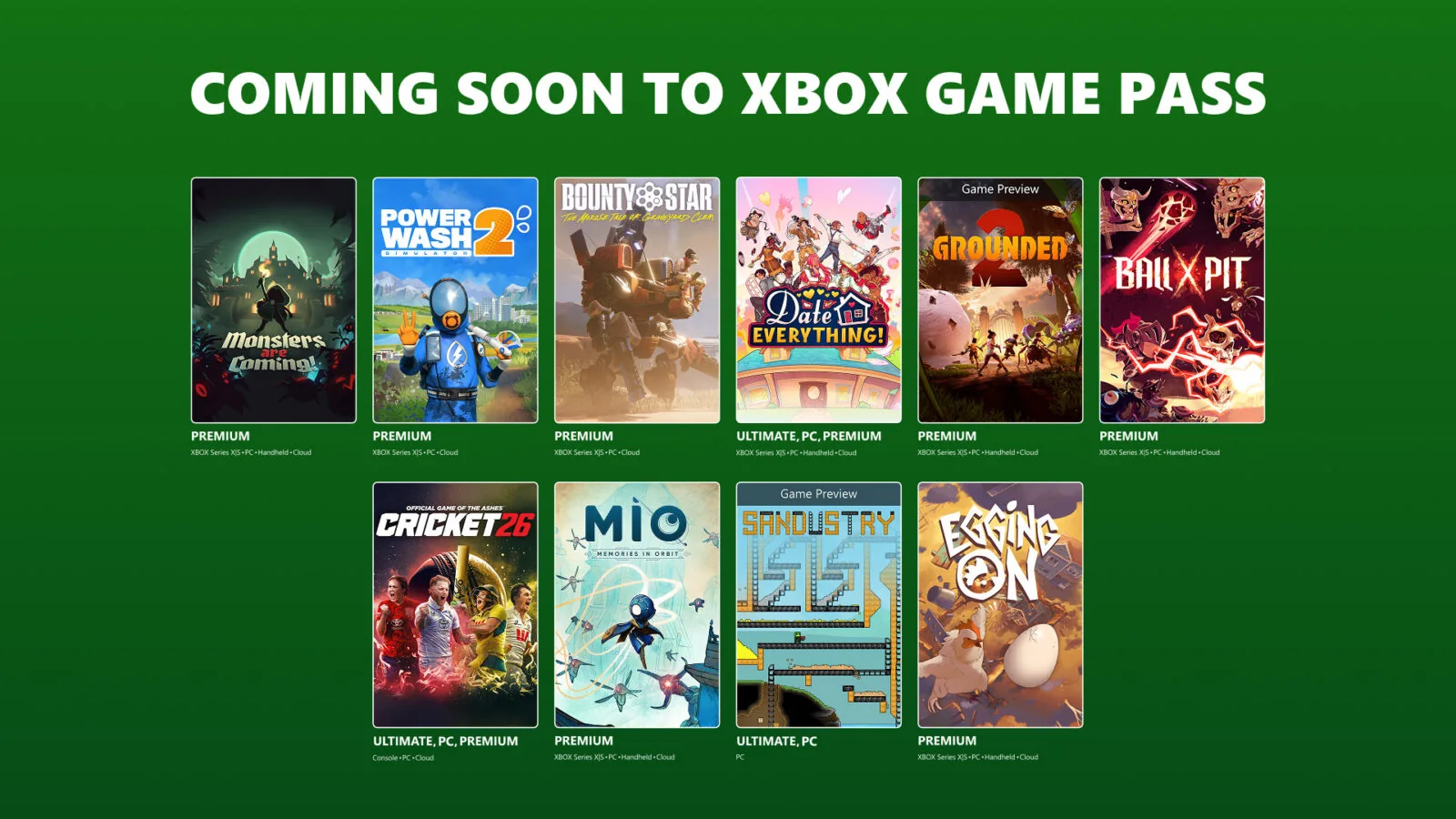
Recent migration waves add another layer. Xbox’s August announcement moved Heretic + Hexen, Monsters are Coming!, PowerWash Simulator 2, Bounty Star, Grounded 2, Ball x Pit, Mio: Memories in Orbit, and Egging On into Premium. Essential was not listed for those additions. That is the normal catalog reason to upgrade: a specific game arrives on Premium but not the curated entry tier.
Do not interpret those examples as a permanent Premium-exclusive list. Some games can later reach Essential, leave both tiers, change edition, or differ by platform. The snapshot also says nothing about whether a title is good for you. Use the recommendation filters to discover candidates, then verify Premium and device support in the live catalog.
A useful shortcut is to group your interests. Premium’s advantage becomes visible if your queue crosses many genres or depends on a particular large franchise. Essential works more like a curated sampler: fewer choices reduce noise, but the chance that a random requested game is missing is much higher.
What do both plans include?
Premium and Essential share more than their game overlap suggests. Both currently include online console multiplayer for paid games, cloud gaming on supported devices, selected in-game benefits, Rewards with Xbox, and member deals or discounts. If your main need is playing an owned paid console game online, Essential can meet that requirement without paying for Premium’s larger catalog.
- Online console multiplayer: included on both plans. Free-to-play console games remain open to Xbox players without a paid multiplayer subscription, so do not buy a plan solely for a free-to-play title.
- Cloud gaming: available with both, but game support, quality, wait times, device, network, and region still matter. A cloud badge is not a downloadable PC or console license.
- Rewards and in-game benefits: both plans participate, but reward rates, eligibility, age rules, markets, and individual offers vary.
- Deals and discounts: both can discount selected games or add-ons. A discount never turns into ownership unless you complete a purchase.
The shared feature list is why the choice should focus on games rather than a vague idea that Premium is “full membership.” Essential already covers the baseline services many console players associate with membership. Premium’s strongest practical upgrade is catalog breadth and access to selected Xbox-published games later in their lifecycle.
Cloud access deserves an extra check. Xbox supports streaming across various device categories, but each plan, game, and region can carry limits, and the highest service level belongs to Ultimate rather than either of these tiers. Review the current plan matrix if streaming quality is more important than the downloadable catalog.
Neither Premium nor Essential is a day-one plan
Despite its name, Premium does not include general day-one Game Pass releases. Xbox currently reserves that benefit for Ultimate and PC Game Pass. Premium is described as receiving selected new Xbox-published games within 12 months of launch, under stated terms and exclusions. Essential has no comparable general promise for new releases.
“Within 12 months” must not be converted into a predicted date. It applies to selected titles, not every Xbox or third-party game, and Xbox’s footnote excludes Call of Duty. A game can reach Premium sooner, later under another arrangement, or not be named until a dated catalog announcement. Essential additions follow their own curated decisions rather than a guaranteed step-down schedule.
The August catalog illustrates the structure. Beast of Reincarnation and Sandustry were labeled day one for Ultimate and PC Game Pass. Meanwhile, eight older or already-available games moved into Premium. Essential was not named for either group. That is evidence for the August lineup only, but it shows why a plan comparison must preserve timing and tier labels.
If launch-week access matters, compare Ultimate rather than choosing between Premium and Essential. If you can wait, inspect the new-games page each month and upgrade only when a confirmed Premium addition matches your queue. Waiting for a real announcement is safer than paying today for an assumed future migration.
When Essential is enough
Essential is enough when the subscription’s service layer matters more than catalog discovery. A console player who mainly buys a few multiplayer games may need online access but have little reason to fund hundreds of rotating alternatives. Essential also makes sense when one or two included games occupy most of your time, such as a persistent multiplayer title or a replayable favorite.
It can also be the better attention-management plan. A 130-game tracked snapshot is still larger than most people can meaningfully play, and a curated set reduces browsing. If your verified queue fits Essential, Premium’s 465 extra options create theoretical breadth rather than usable value. Measure a plan by games started and enjoyed, not by the highest catalog number.
- Choose Essential when your must-play list is fully included on your device.
- Choose it when online console multiplayer is the primary requirement.
- Choose it when cloud access is occasional and the supported Essential games cover your needs.
- Choose it when you buy major releases and use Game Pass mainly as a supplement.
The risk is specificity. Essential is less likely to contain an arbitrary game a friend recommends next month. Before committing, search every title in your near-term queue and verify edition/platform labels. Use the recommendation page only after applying the Essential filter, or you may build a wish list from Premium and Ultimate records.
When Premium is worth the upgrade
| Situation | Why Premium helps |
|---|---|
| Two or more wanted games are missing from Essential | The larger catalog can replace separate purchases during the months you play them. |
| You frequently follow recommendations | 595 tracked playable records make a random cross-genre match more likely than the 130-game subset. |
| You want selected Xbox releases after launch | Premium has a stated later-access path for selected titles; Essential does not have the same promise. |
| Your household has varied tastes | A broader library is more likely to cover family, solo, co-op, sports, strategy, and narrative interests at once. |
The strongest trigger is not “Premium sounds better”; it is a named game. If Minecraft, DREDGE, DOOM, Clair Obscur: Expedition 33, or another verified Premium-only choice will be played now, the upgrade has an immediate job. If your interest is vague, remain on Essential until the catalog creates a concrete reason.
Upgrade timing can also be temporary. A player may use Premium for a few months, finish a focused queue, and re-evaluate before the next billing date. Check subscription-change terms and current regional price rather than assuming a permanent commitment or a globally identical offer. The plan comparison should be read alongside the game filters because shared benefits alone do not explain the price difference.
How to compare your personal game list
- Create a 90-day queue. List active games and realistic next starts, not an unlimited someday backlog.
- Search the exact edition. Base games, deluxe bundles, console versions, and PC versions can carry different records.
- Filter Essential first. Mark every queue item available on your actual platform. If all are present, you have a strong case for the lower tier.
- Filter Premium next. The remaining matches are the real upgrade set. Ignore games outside both plans.
- Check status and dates. “Leaving soon” is playable now but may be a poor reason to start a long campaign. Review the removal tracker before changing plans.
- Verify in the Xbox app or Store. Confirm region, platform, edition, and the account carrying the membership immediately before billing changes.
Then compare the plan difference with alternatives. Buying one frequently replayed game may be better than maintaining Premium indefinitely. Conversely, an upgrade can be efficient when several Premium-only games fit into one or two months. The correct unit is your expected use during the paid period, not catalog size divided by price.
Keep ownership separate from access. An installed game still needs a valid license after a downgrade, and DLC normally requires the base game. Saves may remain, but cross-save and edition compatibility vary; they do not make an unavailable title launch. Use the live catalog for access and the publisher’s support page for save/version behavior.
Premium vs Essential FAQ
Is every Essential game in Premium?
Every currently playable Essential game in our August 11 US snapshot had a matching Premium record. Recheck the live filters because this is a dated result, not a permanent rule.
Do both plans include online console multiplayer?
Yes, under current plan terms. Free-to-play console multiplayer is available without buying either membership, while paid games generally require an eligible plan.
Do both plans include cloud gaming?
Yes, for supported games, devices, and regions. Service level and game support can vary, and cloud availability does not automatically create a downloadable license.
Are Core and Standard still the current plan names?
No. Essential is the current entry-tier name associated with the former Core tier, while Premium is the current name associated with Standard. Old cards, articles, or account histories may retain legacy wording, so verify redemption/conversion terms.
Why are your counts higher than Xbox’s 50+ and 200+ labels?
Xbox uses rounded marketing bands; our database counts distinct tracked game records under one explicit status method. Editions and platform modeling can differ. Use 130 versus 595 only as an August 11 comparison and check the live list plus current plan terms.
Comments
Comments are reviewed before publication. Please keep the conversation helpful and on topic.
Sign in with Google to leave a comment.
Loading comments…