Reported discounts do not reveal a confirmed pricing algorithm
Your Game Pass offer can differ from the price another account displays. Xbox's published promotional terms tell users to sign in for available offers and explain that promotions may be restricted by eligibility, time and region. That supports checking your own quote. It does not establish a confirmed formula for selecting a discount or promise that canceling will produce a cheaper offer.
In its September 8, 2026 report, TechRadar described player accounts showing different promotions, including an Ultimate offer of $16.09 per month for a year compared with the then-standard US $22.99 monthly price. The article discussed returning subscribers and other possible explanations. Those are reported individual observations and theories, rather than a Microsoft announcement of a universal pricing algorithm.
The useful conclusion is narrower than “everyone gets a secret price.” A friend's screenshot can show that a particular offer appeared to that person. It cannot determine whether your account qualifies, whether the promotion is still available, or what your final payment terms will say. It also cannot establish how many subscribers received it.
Xbox's subscription terms explicitly allow promotions that are not valid for all members. A missing discount therefore needs an eligibility and quote check before it needs an explanation about an algorithm. Neither an active membership nor a canceled one guarantees the offer shown in someone else's post.
It is understandable to compare what you pay with another player's reported price. Turn that comparison into a practical check: identify the same plan, read your account's actual offer, and note its billing schedule and renewal conditions. Our plan reference is useful for distinguishing memberships before comparing prices. The rest of this guide focuses on reading the offer you can actually accept, rather than guessing how to become eligible for an unseen one.
Read the offer on the account you actually want to use
Open the offer while signed into the Microsoft account that should receive the membership. If a console or browser has several accounts, verify the identity before proceeding. A lower quote displayed under a different account does not establish that the account you normally use can purchase the same offer.
Keep a private record of the offer details if you are considering it. Include the plan name, displayed currency, promotional period and the terms available at that stage. This is a practical record for your decision, not a guarantee that an unfinished quote will remain available later.
Match the plan, market and account
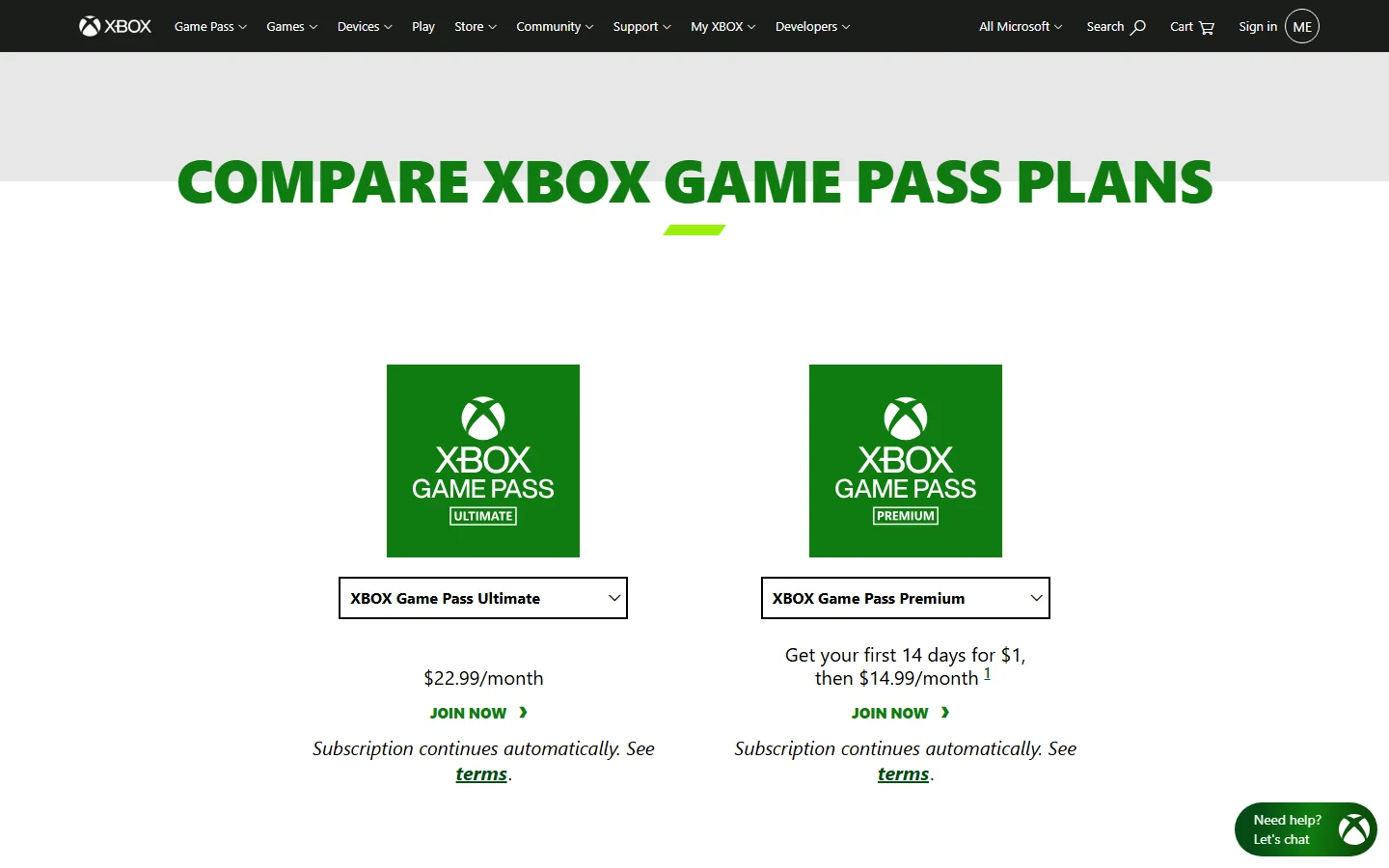
Compare the same membership. On October 9, the public US Xbox comparison page displayed Ultimate at $22.99 per month and Premium with a first-14-days-for-$1 promotion followed by $14.99 per month. Those are different plans and payment periods. A screenshot containing a small initial charge should not be compared with a full recurring month without reading the rest of the offer.
The public page provides a reference, while your signed-in quote determines the offer available to your account. Note the market and currency too. A price in another currency or from a different region is not evidence that two otherwise identical accounts have been charged differently in the same market.
If the region appears incorrect, use Microsoft's region guidance to investigate it. Microsoft recommends changing region when moving to another country or region for a long time and notes that region-specific content can include Game Pass. Treat a region mismatch as an account detail to correct, rather than a method for reproducing another country's promotion.
Open the eligibility and promotional terms
Read the offer's eligibility description before payment. The published terms say a promotion may be for new members, may not be valid for all members, may be time-limited and may be restricted to selected regions. They do not publish a universal waiting period after cancellation that makes every former member eligible again.
For a trial or introductory price, our Game Pass trial guide can help you distinguish an initial offer from ordinary recurring access. Still use the conditions shown for the particular promotion. A banner describes an invitation to check an offer; it should not be treated as the complete eligibility and billing agreement.
If the signed-in purchase flow displays a different price or says you are ineligible, stop before accepting a charge you did not intend. Compare the account, plan and conditions again. You can ask Xbox Support to clarify an apparent discrepancy, but a friend's successful purchase does not oblige the system to present identical terms to your account.
A year of discounted monthly payments is different from a prepaid year
The length of a discount and the frequency of payments answer different questions. “For 12 months” can describe how long a promotional rate applies, while “per month” describes the recurring charge. It does not by itself mean the buyer pays once for a year of membership.
In the reported September example, the displayed rate was $16.09 per month over a year. Twelve such payments would total $193.08 before applicable taxes, if all twelve were made at that rate. This arithmetic describes the reported example, not an offer guaranteed to be available now or to your account.
Before accepting a similar quote, identify what will be charged today, when another charge would occur and how long the lower rate is described as lasting. A monthly discounted subscription, a prepaid subscription code and an account-balance gift card are different products or payment arrangements. Similar “12 month” wording does not make their purchase, redemption and renewal terms interchangeable.
The Microsoft Services Agreement explains recurring payments at the intervals agreed for a subscription. Microsoft's recurring-billing disclosure also says additional terms shown during purchase can differ from the standard terms and apply to that purchase. Read those details before making assumptions about canceling a promotional period early.
In particular, a monthly payment label alone should not be used to promise a refund, a particular cancellation outcome or the continuation of an unused discount after a break. Those questions belong to the actual offer and applicable subscription rules. The point of checking the schedule is to understand the arrangement before relying on it.
For prepaid options, our Ultimate 12-month purchasing guide covers the broader purchase comparison. Keep that separate from whether your account has been offered a promotional recurring rate. A retailer listing may be an alternative to evaluate, but it does not prove you qualify for the discount another member sees on Microsoft's subscription screen.
Compare the full billing timeline
Once you understand the payment cadence, compare the charges over the period you actually intend to use the membership. A percentage discount is useful only alongside the underlying plan, starting price and duration. A large percentage attached to a plan you do not need can still lead to spending you would otherwise avoid.
Make the comparison against your own current arrangement, not just the public reference price. If your membership is already paid through a future date, identify how a purchase or plan change would affect that existing time before counting every promotional month as an additional saving.
Record the promotional charge and its end date
Read the amount due today, the next charge date and the length of the discounted rate. Also distinguish an offer's acceptance deadline from the end of the discount after purchase. They answer different questions: when you must decide, and how long the promotional pricing applies if you accept.
| Detail to record | Question it answers |
|---|---|
| Account and plan | Which membership will receive the offer? |
| Initial charge | How much is payable now? |
| Billing interval | How often will payments be taken? |
| Promotional duration | How long does the lower rate apply? |
| Post-promotion rate | What does renewal cost after the discount? |
| Cancellation conditions | What happens if you do not want to continue? |
Where a detail is unclear, open the linked purchase terms or ask support before accepting. Microsoft's recurring-billing disclosure says purchase-specific additional terms can apply. A headline offering a year of savings cannot replace the conditions describing the actual payment arrangement.
Check the renewal price and taxes
The general Xbox promotional terms say the subscription continues after the promotion at the then-current regular price, subject to change, unless canceled, with applicable taxes. The Microsoft Store terms also describe recurring renewal and pricing. Do not assume today's public rate is a permanent promise for every later renewal.
Use the amounts and tax treatment shown in your purchase flow when estimating your own payments. For a basic comparison, add the promotional-period charges, then any ordinary renewal months you expect to use. If taxes are listed separately, include those rather than comparing one offer before tax with another final total.
Our Ultimate price guide gives broader published-price context. Your decision here is whether the individual offer improves the months you want to play. Save the accepted offer and confirmation if you buy, then check that the subscription information reflects the expected arrangement. A remembered discount percentage is less useful than the plan, dates and amounts actually accepted.
Check your current membership before changing it
If you already subscribe, establish the present expiration or next billing date before making a change. An account-specific offer can be attractive, but the decision also involves the time and benefits you currently have. Do not count a discount as a saving until you understand what the new transaction does to that arrangement.
Keep two questions separate: whether you want the existing subscription to continue, and whether a particular new offer is available. You can answer the first from your own needs and subscription information. Canceling to test a theory cannot establish the second in advance.
Turning off renewal and ending access are different actions
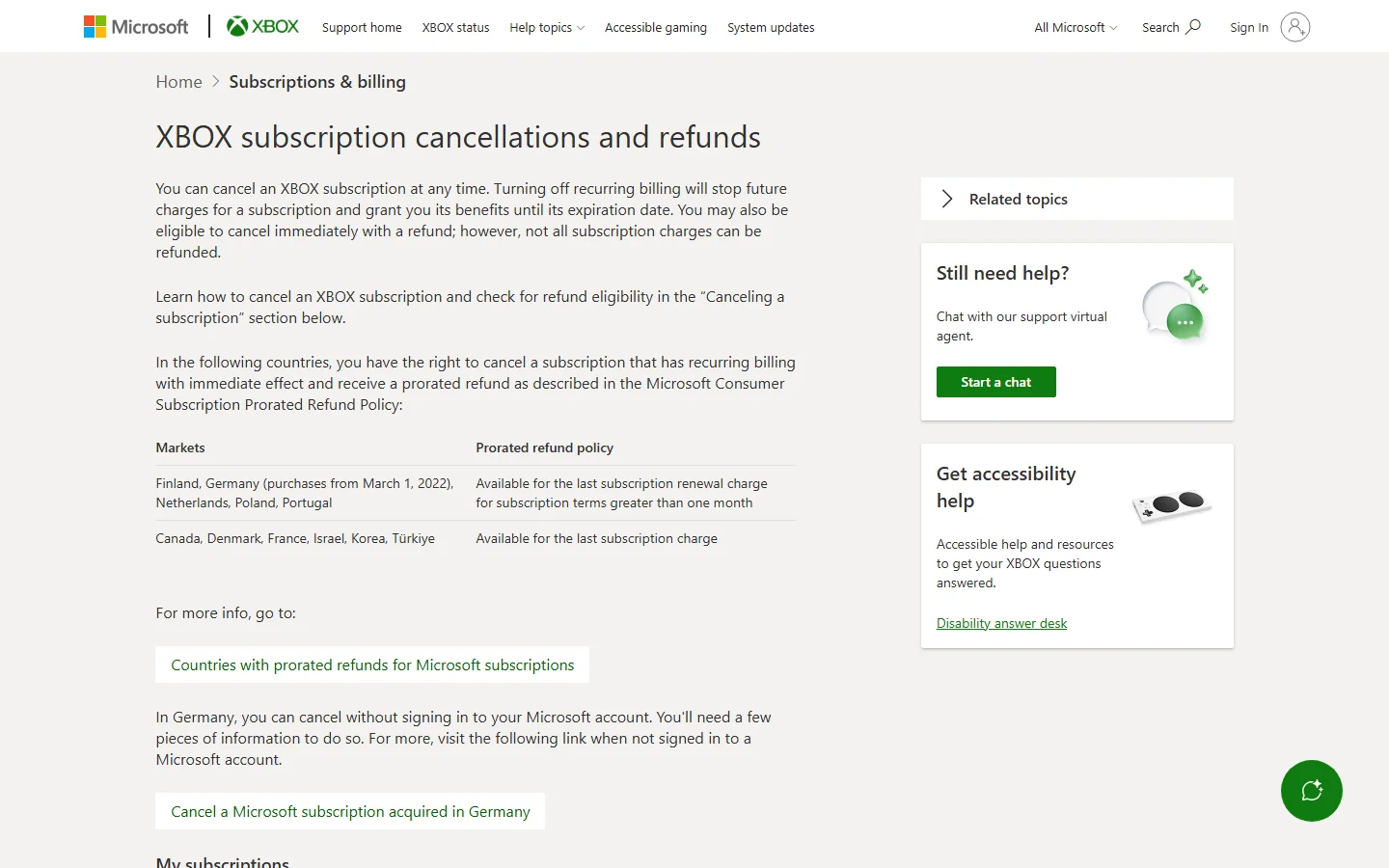
The official Xbox cancellation guidance says turning off recurring billing stops future charges while benefits continue until expiration. Eligible immediate cancellation with a refund is a separate possibility, and not every subscription charge is refundable. Read the choice shown for your account rather than assuming every cancellation button has the same effect.
If you intend to use the time already paid for, check the displayed expiration and renewal state after making any permitted change. If you want an immediate end and a refund, review the eligibility and consequences of that specific option. An account's available choices and any additional offer terms matter more than a screenshot showing what another person selected.
Our membership cancellation guide discusses the broader decision to keep paying. For an offer investigation, the important limit is that switching off renewal or letting membership expire does not guarantee a new targeted quote. Make those changes because they fit your use and payment preferences, not because a reported discount is certain to follow.
Upgrades and prepaid codes have separate rules
Read the official Game Pass conversion guidance before changing plans or redeeming a code. It explains that remaining prepaid time can convert when upgrading to a plan that includes the existing subscription's benefits, using the current conversion ratio. It also describes separate conversions for codes redeemed while certain plans are active.
The page says conversion ratios can change and that prepaid-time upgrade conversion is final and non-refundable. Check the applicable table, your current plan and the resulting date shown before confirming. A code labeled with a number of months does not necessarily add that same number of months to a different active plan.
Do not assume a code will extend an account-specific discounted payment period, combine two accounts' offers or produce the same result as a recurring purchase. Those are separate questions for the actual terms and redemption flow. If the result is unclear, retain the code without redeeming it while you ask for clarification. Understanding the resulting membership is part of evaluating the offer's value.
Decide whether the offer improves your own next months
A useful offer supplies the plan and months you actually want at terms you understand. It is possible for two players to make different decisions about the same discounted rate. Someone who plays regularly across platforms may value a longer period differently from someone who wants to finish one game during a short break.
Use the current library and benefit information alongside the quote. Xbox notes that games, features and availability vary by time, region, plan and platform. A promotion lasting a year does not promise that one particular game stays in the catalog for that entire year. Check our current additions page for recent arrivals and verify the games relevant to your own plans.
Consider three practical outcomes. Accept when the offer is available on the intended account, supplies the required membership and has a clear billing timeline you want. Decline when the plan or duration does not suit you, even if the discount sounds substantial. Ask for clarification when the offer, eligibility, renewal amount or effect on existing time is uncertain.
For example, an occasional player can compare the proposed discounted payments with the shorter membership period they had planned to use. A regular subscriber can compare the quote with their current rate and benefits. These are ways to evaluate the decision, not predictions that one activity pattern earns a better promotion.
If no targeted offer appears, there is no verified account strategy in the reported evidence that guarantees one. You can still compare the published plans, your current subscription and legitimate purchase options. Avoid treating a lower price observed elsewhere as money you will certainly save after canceling or creating a different account.
Before paying, return to the final details: intended account, exact plan, charge today, payment interval, promotional period, renewal terms and existing membership consequences. After purchase, retain the confirmation and review the resulting subscription information. That gives you a concrete basis for using or questioning the offer, regardless of why another account received a different quote.
Comments
Comments are reviewed before publication. Please keep the conversation helpful and on topic.
Sign in with Google to leave a comment.
Loading comments…