
Yes. Gears of War: E-Day launches day one with Game Pass Ultimate and PC Game Pass on October 6, 2026. Eligible members get the standard game release without a separate base-game purchase. The paid Premium Edition can start on October 1; that early-access benefit is not included with the two Game Pass subscriptions.
Preinstall begins September 29, so members can download before the worldwide unlock. The details matter because “Premium Edition,” “Game Pass Premium,” and “day one” refer to three different things. This guide separates the plans, dates, platforms, PC hardware, and co-op access using Xbox's September 2026 launch announcements.
Is Gears of War: E-Day on Game Pass Day One?
Xbox's official game page and September Game Pass update both confirm the answer: Gears of War: E-Day joins Game Pass on its October 6 launch date. The included plans are Game Pass Ultimate and PC Game Pass. Xbox gives the worldwide launch time as 8 a.m. Pacific, or 15:00 UTC.
Quick answer: Ultimate members can play through supported Xbox, PC, and cloud routes. PC Game Pass members can install it through the Xbox PC app. The standard release unlocks October 6; the October 1 window belongs to the paid Premium Edition.
No separate base-game purchase is required while the player's eligible subscription is active and the title remains in the catalog. That is access rather than ownership: cancelling the plan or a future catalog removal can require a purchase or renewed entitlement to keep launching the game.
E-Day is also part of the broader 2026 Game Pass day-one lineup. Its story takes place 14 years before the original Gears of War, following Marcus Fenix and Dominic Santiago as the Locust emerge. The release includes the origin-story campaign, Horde Siege, and Versus multiplayer.
Which Game Pass Plans Include Gears of War: E-Day?
The September 15 catalog announcement names two plans. Check the plan attached to the account rather than assuming that any membership carrying the Game Pass name has the same launch catalog.
| Plan | Included October 6? | Primary route | Caveat |
|---|---|---|---|
| Game Pass Ultimate | Yes | Series X|S, Xbox on PC, supported cloud devices | Device, region, cloud, and online-mode requirements still apply |
| PC Game Pass | Yes | Xbox app on compatible Windows PC | PC must meet the launch requirements |
| Game Pass Premium | Not listed for day one | Not applicable at launch | Do not confuse this plan with the game's Premium Edition |
| Game Pass Essential | Not listed for day one | Not applicable at launch | Future catalog assignments can change |
Game Pass Ultimate on Console, PC, and Cloud
Ultimate is the broadest included route. The official catalog entry lists Xbox Series X|S, PC, Cloud, and a Handheld designation. An Ultimate member can therefore choose a local console install, a compatible PC install, or supported cloud play, subject to region, device, network, catalog, and service conditions.
The membership entitlement does not make an Xbox One run the native Series version or make an under-spec PC meet the hardware requirements. Cloud play may provide a route for devices that cannot install the game, but supported controllers, bandwidth, queue conditions, cloud-hour allowances, and the game's availability must still be checked at launch.
PC Game Pass on Xbox on PC
PC Game Pass members receive the PC version through Xbox on PC on October 6. Install from the Xbox app while signed into the Microsoft account holding the subscription, and verify that the app shows “included with Game Pass” before committing storage or changing plans.
That entitlement is separate from a Steam purchase. Steam is part of the September 29 preinstall announcement, but a PC Game Pass subscription does not become a Steam license. Players choosing between subscriptions and storefront ownership can use the current PC Game Pass price guide and compare the renewal cost with a permanent storefront copy.
Why Game Pass Premium and Essential Are Different
As of September 19, Xbox's E-Day listing does not name Game Pass Premium or Essential for day-one access. Those plans may receive different catalog games and could gain E-Day later, but no future lower-tier date should be assumed until Xbox announces it.
The confusing phrase is Premium Edition. It is a paid edition of E-Day that includes up to five days of early access plus listed digital extras. It is unrelated to Game Pass Premium, the subscription tier. Buying Premium Edition can unlock October 1; subscribing to Game Pass Premium does not appear in the official day-one entitlement list.
Before upgrading or purchasing, compare the current Game Pass plans with the product page shown in the player's region. The decisive wording should name E-Day and the specific account's plan.
Release, Early Access, and Preload Timeline
Xbox published one reference time for the major launch events: 8 a.m. Pacific, or 15:00 UTC. Using UTC prevents daylight-saving and local-date mistakes.
| Date | Time | Event | Who can use it |
|---|---|---|---|
| September 29, 2026 | 8 a.m. PT / 15:00 UTC | Preinstall starts | Eligible Game Pass members and preorder customers on named install platforms |
| October 1, 2026 | 8 a.m. PT / 15:00 UTC | Early access starts | Premium Edition owners |
| October 6, 2026 | 8 a.m. PT / 15:00 UTC | Worldwide launch and included Game Pass access | Standard purchasers, Ultimate, and PC Game Pass |
October 6 Is the Included Game Pass Launch
Ultimate and PC Game Pass members should plan around October 6 at 15:00 UTC. In US Pacific time that is 8 a.m.; in other regions it may be later on October 6 or after midnight on October 7. Search snippets that display only a date can hide this difference.
Check the live countdown in the Xbox app or store shortly before release, especially after travel or a region/account change. Changing the console clock does not change a server-side entitlement. The membership must still be active when the launch license check occurs.
October 1 Early Access Requires the Premium Edition
The paid Premium Edition begins up to five days early on October 1 at 15:00 UTC. Its product listing also includes digital extras. Standard Game Pass access remains October 6, even if a member has already preinstalled every file.
The buying decision is therefore the value of five days and the included extras, not the value of the base game alone. A member who can wait keeps the included October 6 access. A player who wants the earlier window should verify that the selected store SKU explicitly says Premium Edition and shows the early-access date for that account.
Do not assume there is a universal Game Pass “early access upgrade.” Xbox's announcement names the Premium Edition, and storefront offers can vary. Read the contents of the exact product before paying.
Preinstall Starts September 29
Preinstall opens September 29 at 15:00 UTC on Xbox Series X|S, Xbox on PC, and Steam. Xbox specifically says people joining through Game Pass and people who preordered can prepare. Downloading early reduces launch-day transfer time but does not override the October 1 or October 6 license.
Leave more than the stated PC requirement free because decompression, temporary files, platform overhead, and launch updates can need extra room. Keep the Xbox app or console updated, confirm the correct account, and reopen the product page if the install button does not appear immediately at the announced time.
“Gone gold” means The Coalition reached a release-build milestone. It does not guarantee that the preinstall contains every launch file or that no patch will arrive. Check for updates again before the selected unlock time.
Where You Can Play Through Game Pass
The official announcements use several platform labels because installing, streaming, and handheld optimization are different routes. Choose the route first, then confirm the plan, device, and license attached to it.
Xbox Series X|S and Xbox on PC
Xbox Series X and Series S are the named console install platforms. Xbox One is not listed as a native version. An older console may be able to use a supported cloud route with Ultimate, but that is streaming the Series game rather than installing an Xbox One build.
On Windows, Ultimate and PC Game Pass members can install through Xbox on PC. The machine still needs Windows 11 64-bit, DirectX 12 Ultimate, an SSD, a supported ray-tracing GPU, enough memory, and sufficient storage. A Steam preload or purchase belongs to Steam; the subscription's PC entitlement belongs to the Microsoft/Xbox account.
The checked launch announcement does not explicitly settle every cross-save, cross-play, and account-linking scenario. Players moving between PC and console should verify those features in the live product page rather than treating Play Anywhere branding or general Xbox behavior as a promise for every mode.
Cloud and the “Handheld” Label
The September Wave 2 post lists Cloud and marks E-Day for Handheld. Xbox explains that a Handheld designation means a game is optimized for handheld play. It is a compatibility signal, not a separate purchase, a guarantee for every handheld PC, or relief from the system requirements when installing locally.
For a handheld install, check the exact model, Windows version, driver support, storage, memory, and ray-tracing-capable GPU. For streaming, check that the region, account, controller, browser/app, network, and cloud catalog all support the game. Ultimate's cloud conditions and monthly allowance can also affect long sessions.
The practical fallback hierarchy is simple: use a native Series X|S install when available, a compatible PC install when the hardware clears the specifications, or the supported cloud route when local hardware cannot. The September 2026 Game Pass list provides the surrounding catalog and platform labels.
Gears of War: E-Day PC Requirements
The Coalition published final launch targets for three presets. Every tier requires Windows 11 64-bit, DirectX 12 Ultimate, a hardware ray-tracing-capable graphics card, and 115 GB on an SSD. The performance targets use DLSS, FSR, TSR, or XeSS rather than promising native rendering at every listed resolution.
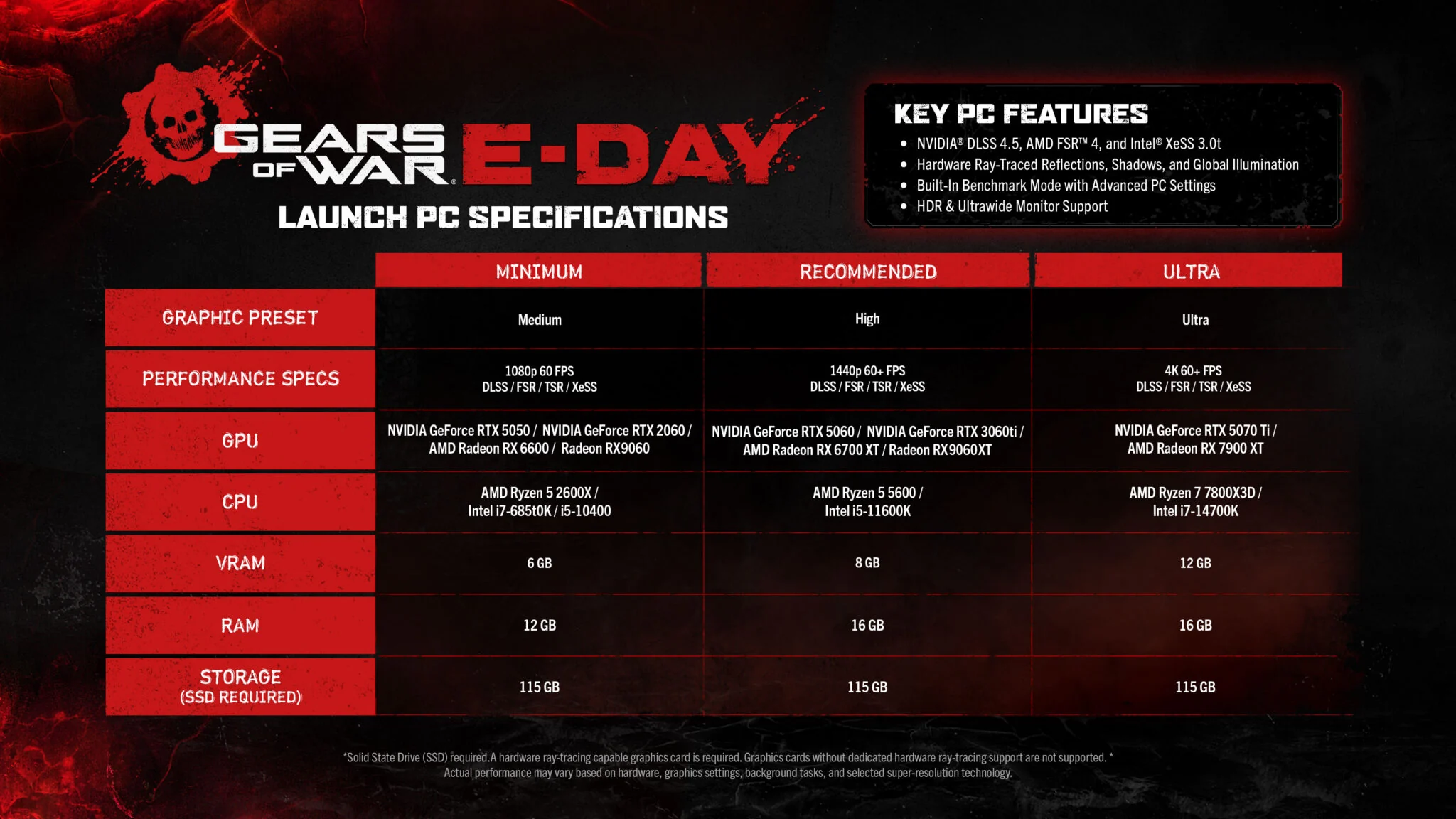
| Target | GPU | CPU | Memory | Storage |
|---|---|---|---|---|
| Minimum: Medium, 1080p 60 FPS | RTX 5050 or RTX 2060; RX 6600 or RX 9060 | Ryzen 5 2600X; Intel i7-6850K or i5-10400 | 6 GB VRAM, 12 GB RAM | 115 GB SSD |
| Recommended: High, 1440p 60+ FPS | RTX 5060 or RTX 3060 Ti; RX 6700 XT or RX 9060 XT | Ryzen 5 5600 or Intel i5-11600K | 8 GB VRAM, 16 GB RAM | 115 GB SSD |
| Ultra: 4K 60+ FPS | RTX 5070 Ti or RX 7900 XT | Ryzen 7 7800X3D or Intel i7-14700K | 12 GB VRAM, 16 GB RAM | 115 GB SSD |
Minimum PC Specification for 1080p 60 FPS
The minimum target is Medium at 1080p and 60 FPS with an upscaling or reconstruction method. The GPU list is Nvidia GeForce RTX 5050 or RTX 2060, or AMD Radeon RX 6600 or RX 9060. CPU options are Ryzen 5 2600X, Intel i7-6850K, or Intel i5-10400, paired with 6 GB VRAM and 12 GB system RAM.
The unusual point is the mandatory hardware ray-tracing capability. A fast older card without dedicated supported ray-tracing hardware is outside the official requirement even if it performs well in other games. Confirm the exact GPU model rather than relying on total VRAM alone.
Also treat 115 GB as the game requirement, not the ideal amount of free space before installation. The Xbox app may need room for downloads, unpacking, shader caches, updates, and Windows. Leaving meaningful extra SSD capacity reduces the risk of a failed preload or immediate storage shuffle.
Recommended and Ultra Targets
For High settings at 1440p and 60-plus FPS, the recommended GPUs are RTX 5060 or RTX 3060 Ti, or Radeon RX 6700 XT or RX 9060 XT. The CPU target is Ryzen 5 5600 or Intel i5-11600K, with 8 GB VRAM and 16 GB RAM.
The Ultra target aims at 4K and 60-plus FPS with RTX 5070 Ti or Radeon RX 7900 XT, Ryzen 7 7800X3D or Intel i7-14700K, 12 GB VRAM, and 16 GB RAM. Both higher targets still specify the 115 GB SSD.
Read each column as a balanced target. Meeting the Ultra GPU line with a much weaker processor does not guarantee the displayed result, and meeting the CPU line with insufficient VRAM creates another limit. The official footnote says performance varies with hardware, settings, background tasks, and the selected super-resolution technology.
Ray Tracing, Upscaling, and the 115 GB SSD Requirement
The feature list names Nvidia DLSS 4.5, AMD FSR 4, Intel XeSS 3.0, hardware ray-traced reflections, shadows and global illumination, plus a built-in benchmark with advanced PC settings. HDR and ultrawide monitors are supported. The performance table also includes TSR among the reconstruction choices.
Technology availability depends on the GPU and driver. The presence of DLSS, FSR, XeSS, and TSR in the game does not mean every version or mode works on every graphics card. Start with the automatic recommendation, run the built-in benchmark, watch VRAM use and frame-time stability, then change one setting at a time.
Before September 29, update Windows, the Xbox app, and stable GPU drivers; confirm 115 GB plus working headroom on an SSD; and remove old capture overlays if troubleshooting. On launch day, benchmark before joining online play so shader compilation or settings changes do not interrupt a group.
Campaign Co-op, Split Screen, Horde Siege, and Versus
E-Day is more than a solo campaign, but the player count and subscription requirement change by mode. The official product copy promises the origin story alone or side by side, Horde Siege PvE, and refined Versus PvP.
Two-Player Split Screen Is Console Only
The campaign supports two-player split screen on console. Xbox's footnote explicitly limits split screen to console, so PC players should not buy or subscribe expecting a local two-person split-screen mode. The supported local setup is an Xbox Series X|S, two compatible controllers, and the console version.
Split screen is not four-player local play. The “up to four players online” language describes online participation, while Horde Siege uses four-player squads and Versus includes 4v4 modes. If the household's main goal is local four-player play, consult the four-player local co-op guide for games that explicitly support that setup.
Before inviting a second local player, update both controllers and create or sign into the profiles the console requests. The checked launch copy does not detail guest-profile rules, achievement ownership, or save progression for the second player, so verify those prompts in the released build.
Online Play and Four-Player Modes Need the Right Entitlement
Xbox says online campaign co-op, Horde Siege, Versus, and other multiplayer features require a Game Pass subscription that includes online multiplayer, sold separately where necessary. Ultimate supplies both the E-Day launch license and console online multiplayer. A purchased console copy still needs the relevant online entitlement for online modes.
Horde Siege is described as an evolved PvE mode in which players choose Assault, Marksman, Medic, or Breacher and form a four-player squad. Multiple squads can tackle shared objectives and world bosses. Versus includes new maps and 4v4 playlists, with Ranked and Social options.
For launch night, every online participant should update the game, sign into the intended Xbox account, confirm their plan or purchased license, and complete any first-run privacy or cross-network prompts. Party members on PC should also finish shaders and benchmark runs before the agreed start.
The official copy says up to four players online across Campaign, Horde Siege, and Versus, but it does not answer every cross-platform, matchmaking, guest, and progression question in the checked announcement. Treat the live mode menus and support notes as the final authority after release.
What Game Pass Members Should Do Before Launch
Use this checklist in date order:
- Now: confirm that the account has Game Pass Ultimate or PC Game Pass and that the next billing date extends through October 6.
- Now: choose Series X|S, Xbox on PC, or a supported cloud route. PC players should compare every component with the official target, not only RAM or GPU memory.
- Before September 29: free 115 GB plus extra working room on an SSD, update the platform app and operating system, and install stable graphics drivers.
- September 29 at 15:00 UTC: start the preload from the account that owns the subscription or preorder. Recheck available space after the download begins.
- Before the chosen start: look for launch updates, confirm controller and headset firmware, and check the store countdown in the local time zone.
- October 1: expect access only if the account owns the qualifying Premium Edition. A Game Pass subscription alone does not unlock this window.
- October 6 at 15:00 UTC: Ultimate and PC Game Pass members can use the included launch entitlement. Online console modes also require the applicable multiplayer benefit.
If the button says “preinstall” but the game will not launch before October 6, the behavior is expected for a standard Game Pass member. If the October 6 license still fails, verify the signed-in account, plan status, region, time, service status, and selected store version before downloading again.
The final answer remains straightforward: E-Day is a day-one Game Pass game for Ultimate and PC Game Pass, with preinstall on September 29 and standard access on October 6. Paying for Premium Edition changes the start date to October 1; a similarly named Game Pass Premium subscription does not.
Comments
Comments are reviewed before publication. Please keep the conversation helpful and on topic.
Sign in with Google to leave a comment.
Loading comments…