Identify the benefit that has not arrived
If Fortnite Crew rewards are missing with Xbox Game Pass Ultimate, start with the membership, the linked Epic account and a qualifying Xbox launch. Then check the delivery schedule for the particular reward. Receiving a Crew Pack does not mean the monthly currency should arrive at the same moment. This guide uses the official guidance available on October 9, 2026.
The current Epic Store Crew listing describes 800 monthly V-Bucks, Crew Pack cosmetics and access to premium pass rewards while the subscription is active. Older screenshots or posts describing 1,000 V-Bucks can therefore mislead a current claim investigation. Compare the benefit you expect with the present official description before reporting an amount as missing.
| What you see | Useful next check |
|---|---|
| No Crew benefits at all | Confirm Ultimate, the linked accounts and the launch route. |
| Crew Pack received, currency missing | Find the billing date and check the currency delivery window. |
| Currency received, new Crew Pack missing | Check the separate Crew Pack schedule. |
| Benefits appear on an unexpected account | Verify the Xbox display name connected to the intended Epic account. |
These are diagnostic starting points, rather than a guarantee about your particular account. Write down which benefits actually appear and which do not. “Crew is broken” gives support less to work with than “the current outfit is in my locker, but the monthly currency has not appeared after the displayed billing date.” A precise description also stops you repeating a membership check when the outstanding question is a date.
Keep subscription access and ordinary game access separate. A successful Fortnite launch alone cannot establish that the signed-in account has Ultimate or that Crew has been activated correctly. Use our Game Pass plan reference if you need to identify the membership, then follow the account and reward checks below. There is no need to buy a second Crew subscription simply to test whether the included benefit works.
Verify Ultimate and the linked Epic account
There are two account checks to make before changing an installation or waiting for currency: which Xbox account holds the qualifying membership, and which Epic account is connected to it. Checking these separately makes a mistaken sign-in easier to spot. Use the accounts actually open in the membership and game services, rather than assuming every device uses the same identity.
Check the membership attached to your Xbox account
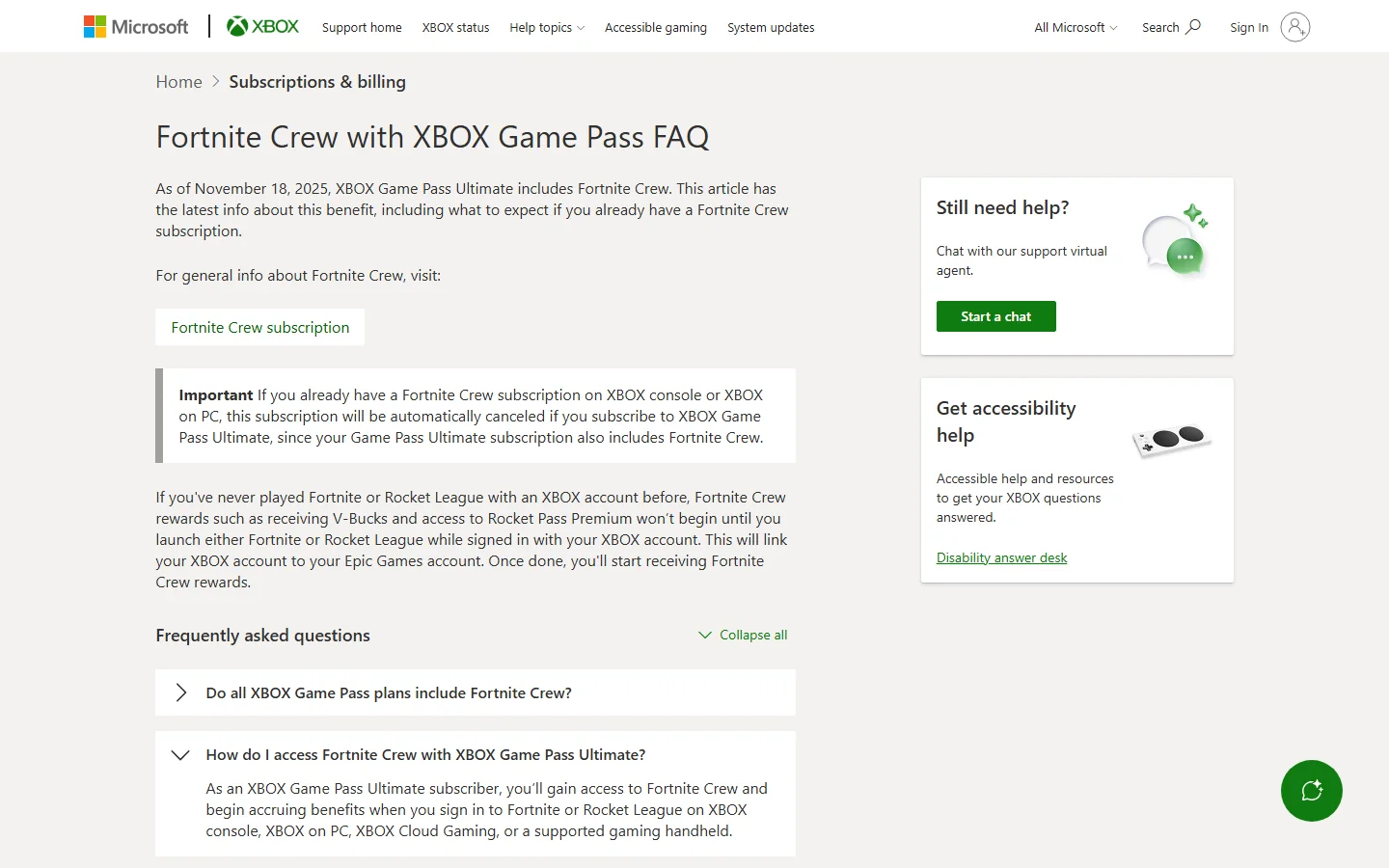
Epic's availability guidance dates the included Crew benefit to November 18, 2025. The Xbox FAQ specifies Ultimate as the qualifying plan. Having a different Game Pass membership does not satisfy that requirement. Our Ultimate and Premium comparison helps if similar plan names caused the confusion.
Open your Microsoft subscription information using the Xbox account you intend to use for Fortnite. Confirm the plan name and present status. An old purchase receipt establishes a past transaction; the current subscription screen answers whether the membership is active now. Make a note of an expiration, cancellation or account discrepancy instead of trying to solve it through Fortnite's locker.
Also check the Crew subscription status in Fortnite or the relevant subscription management page. These observations let you distinguish a qualifying Microsoft membership from a Crew entitlement that is not showing as active. If Ultimate is active but Crew is not, retain both observations for support rather than treating one screen as proof that the other service has completed activation.
Confirm the Xbox display name in Epic linked accounts
Follow Epic's connected-account instructions: sign into the intended Epic account and open Linked accounts. The page displays the name associated with each connected platform. Check the Xbox entry against the account holding Ultimate. This is a more useful comparison than expecting every game's display name or email address to look identical.
If the Xbox entry identifies an unexpected account, pause before disconnecting anything. Epic's already-connected account guidance explains that a console account can be associated with an Epic account that has incomplete registration details. It also cautions that unlinking an automatically created account can remove access to its game data through that console.
Record the mismatch and use the relevant Epic account guidance to resolve it. Creating another account is not a reliable test for retrieving benefits on the original one. The aim is to identify where the subscription and your Fortnite progress already belong, then proceed with the correct identity. Keep any account identifiers you collect for a private support case.
Launch Fortnite through the route that claims the benefit
After verifying the accounts, check how Fortnite was launched. Epic's current missing-benefits guidance requires a qualifying Fortnite sign-in at least once per month. Merely linking accounts and continuing to play through an unrelated platform is not the full check described in that guidance.
Record both the device and the service used. “I played on a laptop” does not distinguish an Xbox app installation from another launcher, and “I used my phone” does not identify the cloud service. That distinction gives you a concrete next step without treating every successful game session as evidence of an Xbox benefit claim.
On PC, install through the Xbox app first
Epic specifically tells Ultimate members on PC to install Fortnite through the Xbox app first, then sign in to trigger redemption. Open that app with the intended Xbox account, locate Fortnite and use the installation route it provides. Once installed, launch and sign in, then check the Crew information in the game.
If your previous session used the Epic Games Launcher, do not count that session alone as satisfying the Xbox app instruction. This is a question about the benefit's activation route, not a claim that your existing Epic account or progress is invalid. Establish the account connection first and follow the official installation direction.
Xbox's PC launch announcement confirms Fortnite's arrival through Xbox on PC. That announcement is historical, so use current Epic help for today's reward amount and troubleshooting conditions. An older launch graphic cannot replace the present claim instructions.
On console, cloud or a supported handheld
The other routes Epic lists are an Xbox console, Xbox Cloud Gaming and a supported gaming handheld. Use the Xbox account associated with Ultimate and confirm the linked Epic identity in the launched game. A handheld's physical shape is not enough to establish eligibility: the guidance specifies a supported device and Xbox route.
On cloud, distinguish the service from the browser running it. Opening Fortnite on a mobile device through Xbox Cloud Gaming is the relevant route in Epic's list; a Fortnite session through another service is a different observation. Our free cloud-play guide explains why being able to launch a free game does not itself prove Ultimate membership.
Once you have completed a qualifying session, note its date and route. You then have a useful record for deciding whether the remaining issue is currency timing, a missing Crew Pack or an entitlement that is still inactive. Repeating account changes or deleting an installation gives you less diagnostic information than one verified launch and a clear description of the result.
Match the missing reward to its delivery date
Once account and launch checks are complete, use the schedule for the missing reward. Crew Pack cosmetics and monthly V-Bucks have different timing. Looking at a new outfit announcement alone does not tell you when your individual currency grant is due.
Make a short record with the displayed billing date, the time you completed a qualifying Xbox sign-in and the reward you are missing. These facts let you decide whether a delivery window is still running. They also make a later support message more useful than a list of unrelated restarts.
V-Bucks follow the billing date
Epic's missing-currency answer says the 800 V-Bucks are added on your billing day, with the exact date depending on the subscription date or primary platform. If you previously had Xbox-billed Crew and now receive it through Ultimate, that date may have shifted to match the Game Pass billing date.
Check the current date shown for your subscription rather than remembering the date of an older standalone purchase. In Fortnite, Epic's billing-date instructions direct you to Passes, Fortnite Crew, Manage Subscription and Cancellation Info. The next billing date is shown there. The account website also offers subscription management, with external-platform purchases directing you to the appropriate management route.
For a hypothetical example, a member whose displayed billing day is the 18th should not use a new Crew Pack appearing around the start of the month as evidence that the 18th's currency has already been missed. The example illustrates how to read two dates; your displayed subscription information determines your own case.
Epic says currency can take up to 72 hours to appear. If it remains missing after that period, log out and back in. Waiting should be tied to the relevant delivery date, rather than restarted indefinitely after every unrelated session. Keep the date and outcome of that sign-in for the next support step if the grant still does not appear.
Crew Packs follow a different monthly schedule
The missing Crew Pack article gives approximately 8 PM ET on the last day of each month as the delivery time and allows up to 72 hours afterward. Use the stated time zone when comparing it with your own local date. Midnight where you live is not necessarily the reference point in that guidance.
After that window, Epic tells players to confirm an active subscription and the correct Epic account, sign out and back in on the purchasing platform, and restart the device. Check the particular outfit or pack you expect, rather than assuming currency receipt establishes cosmetic receipt. Where the subscription is supplied through Ultimate, retain that billing context in your support record.
The practical result is two separate timelines. One can be correct while the other still needs investigation. Recording the outstanding reward and its reference date helps you follow the appropriate instructions without concluding that every part of Crew has failed.
Review subscription changes before buying Crew again
A recent membership change can make the old billing route a poor reference. Epic's Xbox transition answer says a standalone Crew subscription on Xbox console or Xbox on PC is automatically canceled when Crew is provided through Ultimate. The Crew benefit continues through the qualifying Ultimate membership.
If an older standalone subscription no longer appears as active, investigate the new entitlement rather than immediately buying it again. Check the current Ultimate status and the account connected to the game. An old cancellation and an included benefit can coexist; the cancellation of the former alone does not tell you whether the latter was claimed successfully.
Apply that automatic transition only to the Xbox situation the guidance describes. For a subscription billed elsewhere, consult Epic's purchasing-platform cancellation instructions. Identify the seller through your subscription information or payment record before making changes. Moving between payment services is a separate decision from troubleshooting a delayed grant.
Account changes have another limitation. Xbox's FAQ says changing the linked Xbox account does not grant previous Crew Packs, V-Bucks grants or passes; the changed account receives current and future benefits. A successful account correction should therefore not be treated as a promise to recover every missed historical reward. Keep any question about a particular past grant explicit in the support case.
Eligibility also has a market boundary. As checked on October 9, the Xbox FAQ lists Crew with Ultimate in its supported markets except Hong Kong and Taiwan. If the benefit is absent entirely, check the official market information rather than assuming a delivery timer applies everywhere.
Finally, verify whether Ultimate has actually expired or changed to another plan. The FAQ explains that continuing Crew after the qualifying Ultimate subscription expires can require resubscribing separately. Our Essential and Ultimate comparison can help with the plan decision. Decide whether you want a new paid subscription only after establishing the status of the included one; buying again is not a diagnostic step for a missing monthly reward.
Send the right support team a precise case
If the checks have not resolved the issue, describe the point where the expected result stops. Membership status, account linking, the qualifying launch and reward delivery are distinct observations. Sending those facts together gives a support team a clearer starting point than simply reporting that Crew did not work.
Check the live Epic status page for relevant service incidents before repeating troubleshooting. Its information changes over time. A general service status does not establish what happened to one grant, just as one missing reward does not establish a widespread outage.
An inactive membership needs Xbox account support
Epic's missing-benefits guidance directs players with an inactive Crew subscription to Xbox Support. Explain that you are trying to use Crew through Ultimate and state what each subscription screen shows. If the Microsoft membership is active but the Crew status is not, include that distinction rather than choosing one screen and omitting the other.
Keep the relevant purchase or membership details available for the private support process. Do not use a new purchase, repeated plan changes or an account disconnect as a substitute for identifying the entitlement problem. Support can assess the specific account; a general guide cannot confirm a fix or issue a missing grant on its behalf.
An active membership needs a reward-specific record
For an active subscription with a remaining reward problem, follow the appropriate Epic missing-currency or missing-pack guidance and use Epic Games Support when further help is needed. Prepare the reward name, the reference date, the launch route and the result of the recommended sign-out or restart. These are useful case notes, rather than a claim that every support form requires identical fields.
- Which Epic account and linked Xbox identity are involved?
- What does the current subscription status show?
- When and through which Xbox route did you sign into Fortnite?
- Which reward is missing, and which benefits already appear?
- Has the appropriate 72-hour window passed, and what happened after the suggested check?
A concise example would be: “Ultimate is active, the linked Xbox name is correct, I signed into Fortnite through Xbox on PC on this date, and the Crew Pack appears. The monthly currency remains missing more than 72 hours after the displayed billing date.” Replace those observations with your own facts. If the problem is an inactive membership instead, lead with that.
Keep the conversation focused on the unresolved step. You should finish with a verified claim route, a reward-specific date or a support case that records why those checks did not resolve it. That is more useful than buying Crew twice or waiting for the start of another month without checking which schedule applies.
Comments
Comments are reviewed before publication. Please keep the conversation helpful and on topic.
Sign in with Google to leave a comment.
Loading comments…